Tailscale Blocked? Moving Tally Prime ERP to Twingate ZTNA
When TRA Oman blocked our VPN protocol, operations halted across 4 branches. Here is the technical and business breakdown of how we migrated to Zero Trust architecture and restored operations within 48 hours.
Outcome: 4 branches offline Thursday morning → ERP access restored within 48 hours via Twingate ZTNA, zero public server presence, Tailscale-failure VPN tickets eliminated. In Oman, the Telecommunications Regulatory Authority (TRA) maintains strict control over VoIP and VPN traffic. A single ISP-level DPI update crippled our Tally Prime ERP for an entire day. I had signed off on that VPN design, so the outage was mine before it was anyone’s.
Four branches dark on a Thursday, and the fix turned out to be killing the VPN entirely. That outage forced the migration that eliminated the whole class of failure for good. The full project record is the RDS migration case study, one entry in a decade of digital transformation at Maryana Group.
Thursday morning: four calls in fifteen minutes
Thursday, 9:00 AM. Four branch managers call within 15 minutes. Remote users can’t connect to the Tally Prime ERP hosted on our central Windows Server 2019 RDS.
The symptoms were consistent. Connection attempts timed out with no error messages, and services that worked yesterday failed silently.
Running tailscale netcheck confirmed the diagnosis: UDP was being blocked. The ISP had deployed a new DPI rule targeting WireGuard signatures. Our custom DERP (Designated Relay) servers were also being blackholed. The ISP wasn’t just blocking the protocol. It was identifying our infrastructure by its fingerprint.
Operations across all four branches stopped. No invoices. No inventory checks. The IT team had six hours to find a solution or escalate to leadership with a business-stoppage declaration.
Why Traditional Fixes Don’t Work Against DPI
The instinct from the team was to find a workaround: change the port, try a different protocol, anything to get around the block. I let us burn an hour on that instinct. It bought nothing.
Changing ports: DPI analyzes traffic behavior. Port numbers never enter into it: WireGuard’s packet signature reads the same on every UDP port. The ISP wasn’t inspecting port 41541. It was recognizing the protocol itself.
OpenVPN over TCP: We tested this. It’s too slow for RDP traffic. The protocol overhead combined with TCP’s congestion control makes remote desktop unusable. It also gets flagged by the ISP, though less consistently than WireGuard, which leaves you with connectivity sometimes worse than none at all.
Dedicated VPN lines: Physically leased lines that bypass internet infrastructure entirely. Expensive (thousands of dollars in setup fees) and takes weeks to provision. Not a solution for a 48-hour crisis.
The common thread: all of these approaches try to make the same thing look different. DPI is sophisticated enough to see through the disguise.
A different question: what if there is no VPN?
Instead of finding another way to make a VPN work, I asked a different question: what if we didn’t use a VPN at all?
Zero Trust Network Access (ZTNA) works on a fundamentally different architecture. The old model is a gate around the network. The new model is a gate around every single resource.
What we needed:
- A protocol with no recognizable fingerprint: standard TLS, indistinguishable from normal web traffic
- No inbound port forwarding (our gateway sits behind double NAT, so anything listening on a public port was out)
- Outbound-only connections. The client dials out; the server never opens a listener.
The solution: Twingate.
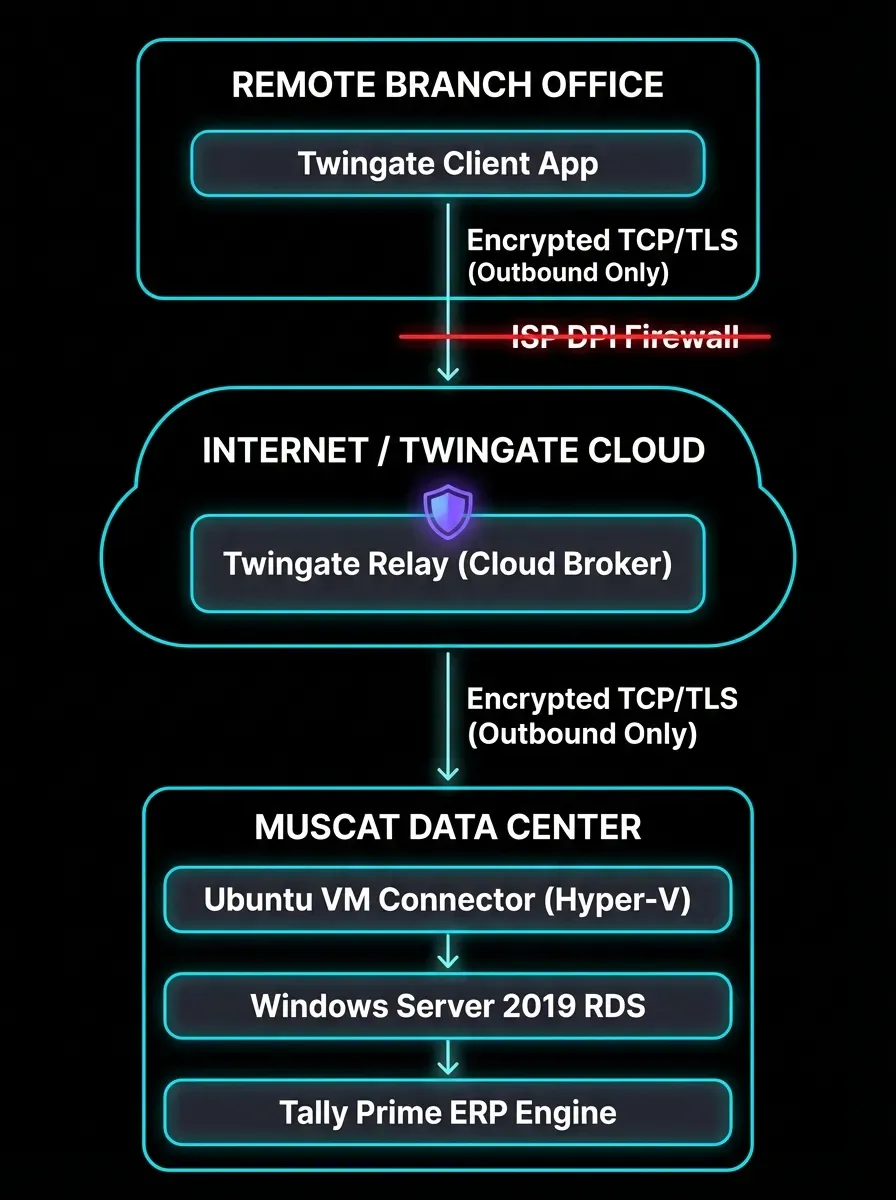
The architecture uses outbound-only TLS connections indistinguishable from regular HTTPS traffic. There’s no VPN protocol to recognize and no packet signature to match. As far as DPI can tell, it is web browsing.
From one big tunnel to one small gate
Old Model: VPN Tunnel
User Laptop → VPN Client → VPN Gateway → Full subnet access → ERP ServerThe user authenticates once and gets access to the entire corporate network. That convenience is the threat model traditional VPN asks you to accept:
- If the user’s laptop is compromised with ransomware, the tunnel gives it access to every machine on the subnet
- If the VPN credentials are stolen, the attacker has persistent network access without needing to be on-site
- The VPN gateway is a single point of failure that, when compromised, exposes everything
This was acceptable risk in 2010. It’s not acceptable risk in 2024.
New Model: Zero Trust
User Laptop → Twingate Client → Twingate Relay (outbound TLS) → Internal Connector → ERP Server (only)The user authenticates via our Identity Provider (IdP, Google Workspace in our case). Twingate’s client initiates an outbound TLS connection to Twingate’s relay, which proxies it to our internal connector. The connector validates that the user is authorized for one specific resource: 10.0.1.25:3389 (RDP to the ERP server).
That’s it. Nothing else is accessible. The connector has no other ports open. The server has no presence on the public internet.
The critical difference: There are zero inbound ports open on our firewall. The connection is established from the inside out using standard web traffic. A Shodan scan of our public IP returns nothing. There’s nothing to discover.
The Saturday surprise: SSL certificates
Zero Trust handles the routing, but Windows RDS has a stubborn requirement: it expects a valid SSL certificate for the hostname being accessed (rdgateway.company.com).
Since Twingate routes the connection internally using the private IP, the hostname on the certificate didn’t match the routed address. The RDP client rejected the connection with a certificate name mismatch error.
The fix: win-acme with Cloudflare DNS validation to generate a Let’s Encrypt certificate for the internal server hostname. Then bound it to all RDS roles via PowerShell.
# Bind the certificate to RDS roles
$cert = Get-ChildItem -Path Cert:\LocalMachine\My | Where-Object { $_.Subject -like "*rdgateway*" } | Select-Object -First 1
$thumb = $cert.Thumbprint

# Apply to RD Gateway, RD Web Access, and RD CAP
Set-ItemProperty -Path "HKLM:\SYSTEM\CurrentControlSet\Services\TermService\Parameters\SSL" -Name "MachineSSLThumbprint" -Value $thumb
This took two hours to implement and document, and it nearly slipped past me: on paper the tunnel was up, and a tunnel-up check would have called the migration done while every session still failed.
What the business got
Operations restored within 48 hours. From incident declaration to full branch connectivity. The migration itself took six hours; the rest was testing and rollback planning.
Security posture changed in four verifiable ways (matching the work entry’s 0-business-days cutover, 36h window):
- Server has zero public internet presence: a Shodan scan returns nothing, and that empty result is my favourite line in the whole report
- Microsegmentation: users can reach the ERP server and nothing else on the subnet
- Identity-tied access, not location-tied: a coffee shop is the same security model as the office
- A compromised laptop stays a compromised laptop instead of becoming a compromised network, because there is no tunnel for ransomware to ride
Operational improvements:
- “VPN is down” support tickets of the Tailscale-failure class: eliminated entirely (the architecture no longer has a WireGuard handshake to fingerprint; see Lesson 2)
- New branch provisioning: instead of configuring VPN tunnels and firewall rules, it’s now a Twingate connector install + DNS update
- Incident response: compromised credentials are revoked at the IdP level, access is terminated within seconds
The Takeaway
Zero Trust isn’t a product category. It’s an architectural philosophy: assume the network is hostile and verify every request. Then minimize the blast radius.
In regulatory environments where traditional VPN protocols are blocked, ZTNA isn’t a preference — it’s survival. But even in unrestricted environments, the security properties are worth the migration complexity.
The cost of the migration is one week of engineering time. The cost of not migrating is a single incident that halts operations for four branches simultaneously. That’s the business case that justified this project to leadership.
Every ISP DPI update before this redesign was a rehearsal for that Thursday: four branches idle, no invoices, six hours burning on port changes DPI sees through. Any business running ERP behind a fingerprintable tunnel carries the same single point of failure, Oman or anywhere. I wrote the decade of lessons for the long view, the OpenClaw nerve center applies the same no-inbound-ports principle to a personal setup, and the Zero Trust for Small Business guide curates the whole record, with the intake checklist and the Phase-2 plan attached.
Related logs
ZTNA Phase 2: The Plan and the Definition of Done
The /now entry commits to moving the last Tally Prime hop off the legacy VPN segment onto ZTNA. This is the plan, not a build log: what Phase 1 proved, what the last hop needs, and what done looks like — no completion claims yet.
What I Ask Before Touching Your VPN
Five outputs before any migration sketch: netcheck UDP, DERP reachability, the cert subject names, the NAT shape, and the rollback plan. Drawn from the RDS cutover's transcripts and ADR-003.