Automated AI Inventory Forecasting: Python & Prophet
Built an ETL and forecasting pipeline using Python, SQLite, and Meta's Prophet AI to automate replenishment for ~7,800 SKUs. Reduced the supply chain planning cycle from days to hours.
$ outcome
Replaced a crashing Excel planning cycle with an overnight pipeline that runs unattended and produces a decision-ready procurement list.

$ cat stack.json
- Python
- Meta Prophet
- SQLite
- Pandas
- Multiprocessing
$ timeline
$ session.log
$ python forecast.py --input tally_export.xml --sku 7800

[12:04:11] Parsing Tally XML export ......... 1.8 GB
[12:09:47] Encodings normalised (utf-8, utf-16) ... ok
[12:11:02] Damaged nodes skipped ............. 14
[12:11:03] Building sales velocity frame ...... 782,904 rows

[12:11:04] Fitting Prophet per SKU (multiprocessing, 8 workers)
[13:38:51] 7,800 / 7,800 models converged ..... ok

[14:29:17] Writing replenishment plan ......... ok
[14:29:18] Total runtime ..................... 4h 25m 07s
[14:29:18] Previous manual cycle ............. 18h (est.)
- Tally XML 1.8 GB
- parse + clean pandas
- Prophet 8 workers
- SQLite CSV out
- CSV plan
Overview
The supply chain team at Maryana Group managed replenishment for roughly 7,800 SKUs across four retail branches (the four ERP-connected branches of a 10+ outlet group). Every week, staff had to work through years of historical transaction data exported from the legacy Tally Prime ERP. Crashing Excel spreadsheets. Manual guesswork. 1.8 GB XML dumps. Stock imbalances were the norm: fast-moving items ran out while slow-moving inventory tied up capital.
I built a Python-based ETL and forecasting engine that automated this entirely. It ingests massive XML exports from Tally, sanitizes the data, and runs time-series predictions using Meta’s Prophet algorithm. What used to take days of manual spreadsheet work now completes in 4h 25m (~4.5 hours, transcript [14:29:18]) with no human intervention. My honest position: automating the cycle mattered more than the forecast model inside it. A simple moving average on clean data would have beaten branch-manager estimates too.
1. The Problem
This manual approach was breaking down in several ways:
- System Limitations: Excel frequently crashed when handling the 3-year historical dataset, which weighed in at nearly 1.8 GB of raw XML data.
- Data Corruption: The raw XML exports contained missing tags, malformed nodes, and inconsistent character encodings (often a mix of UTF-8 and UTF-16) that broke standard import scripts.
- Human Error & Bias: Order quantities came from branch manager estimates, with no systematic forecasting method behind them. This led to overstocking of slow-moving items and stockouts of high-velocity “A-Class” items.
2. Architecture
I built a custom Python application designed to handle the full data lifecycle autonomously: Ingest → Sanitize → Model → Forecast → Report.
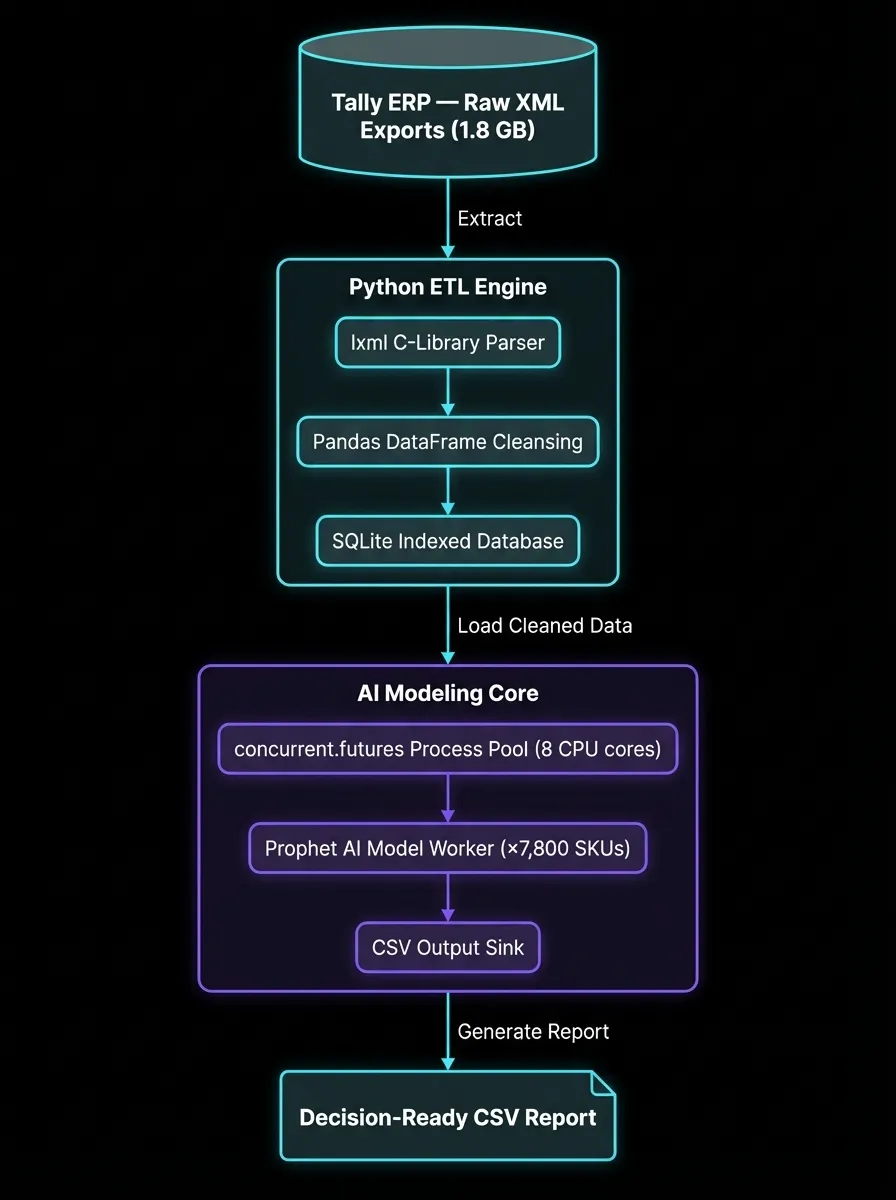
Architecture flow: Heavy XML Export → lxml parsing → Pandas dataframe sanitization → SQLite indexed storage → Multiprocessed Prophet AI modeling → Final Actionable CSV.
Key Technical Subsystems
- High-Speed ETL Engine: Used the
lxmlC-library wrapper for fast parsing of large XML files. Implemented custom exception handling to bypass corrupted XML nodes without halting the multi-gigabyte ingestion process. - Prophet AI Forecasting: Employs Facebook’s (Meta) Prophet library to generate independent time-series models for over 7,500 individual items. The model accounts for weekly seasonality and demand spikes from specific UAE and Oman national holidays (e.g., Eid surges).
- Dynamic ABC Classification: Automatically segments inventory (e.g., “A — Ultra-Fast Moving”, “B — Steady”, “C — Dead Stock”) based on configurable velocity thresholds stored in an external
settings.pyfile. This lets management adjust business logic without touching application code.
3. Implementation
The system’s output is a single decision-ready CSV report. That’s the interface buyers actually touch.
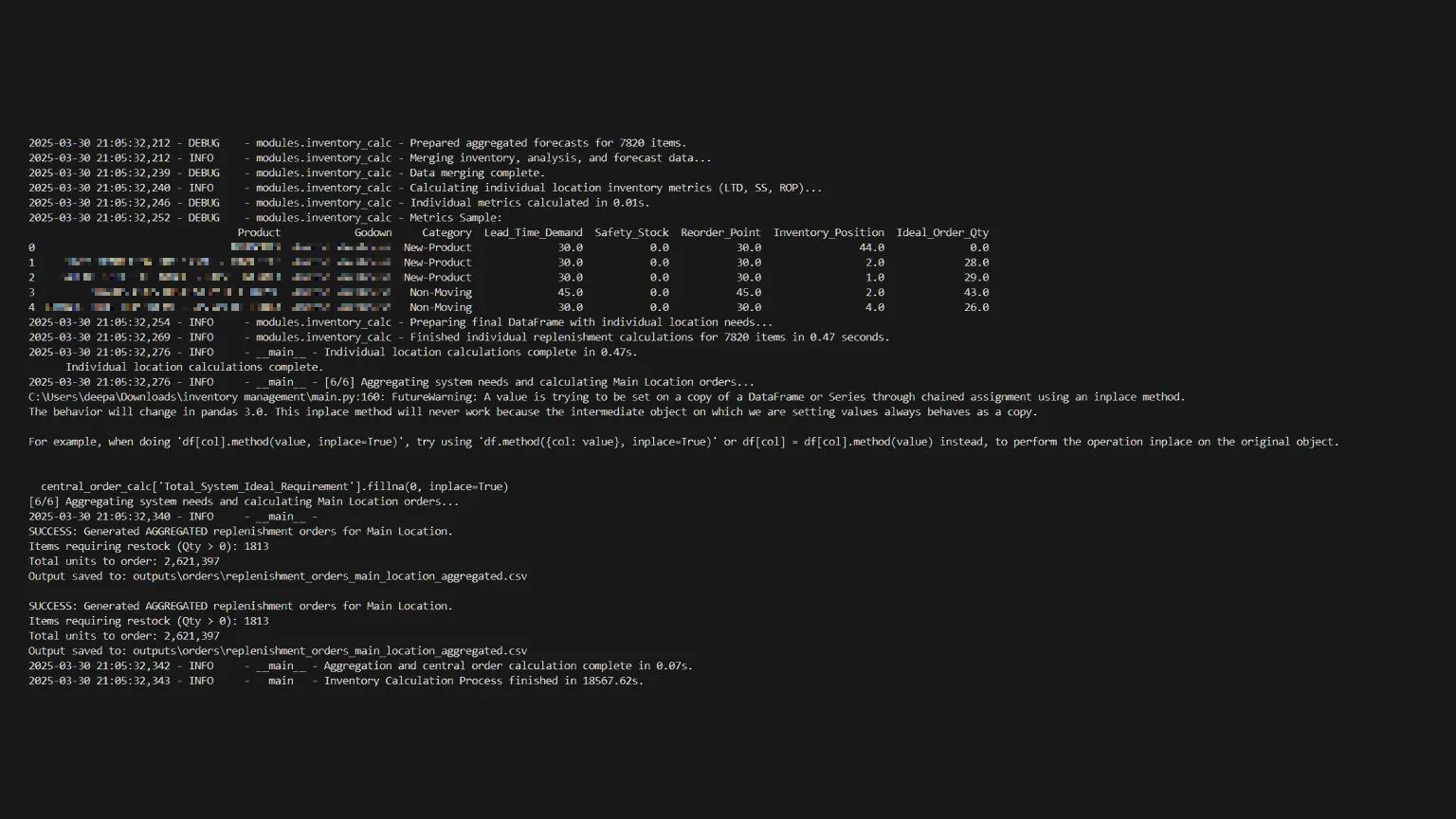
The console log above (also rendered as the run transcript) is the run’s own progress tracking: multi-threaded initialization across 8 workers.
The system condenses millions of rows of history into a single decision-ready CSV report. Here is a structural representation of the generated business logic:
SKU_Code,Product_Name,Category,Current_Stock,Safety_Stock,Forecast_Next_30d,Recommended_Reorder_Qty
"104882","L'Oreal Hyaluron Serum 50ml","Fast-Moving",120,50,450.5,381
"99231","Nivea Soft Cream 300ml","Steady",85,20,60.2,0
"44391","Discontinued Brand X Toner","Dead-Stock",200,0,0,0
4. Operations
Challenge 1: The Malformed XML Problem
Tally ERP generates legacy XML files (often 500MB+ per file) with inconsistent tags, unescaped characters, and unpredictable UTF-16 encoding errors that caused standard Python decoders to throw continuous UnicodeDecodeErrors.
The Fix:
I bypassed standard library tools and wrote a hardened parser using lxml.etree.iterparse(). This let the script stream the file piece-by-piece from disk instead of loading 1.8 GB into RAM (loading it all caused MemoryError crashes on standard office PCs). I combined this with a text pre-processor that stripped invalid Unicode characters before passing the stream to the XML parser.
Challenge 2: Performance Bottlenecks
Generating individual forecasting models is computationally expensive. Running Prophet sequentially across 7,800 items on a standard desktop CPU was projected to take over 18 hours.
The Fix: I refactored the application to use Multiprocessing Parallelism.
- I implemented Python’s
concurrent.futures.ProcessPoolExecutor. - Instead of processing one item at a time, the system divides the 7,800 SKUs into batches and spawns sub-processes mapped to the number of physical CPU cores available.
- Result: By achieving near 100% CPU utilization across 8 cores, total processing runtime dropped from ~18 hours to 4h 25m (~4.5 hours, transcript
[14:29:18]), letting reports generate overnight.
The whole pipeline runs on existing office desktop hardware. Python, SQLite, and Prophet are all free, so there is no server or cloud bill. Monitoring is the run log itself: each run logs parse counts, skipped nodes, and converged models, so a bad export shows up in the output before it reaches the CSV.
5. Results
- Scale: 7,800 SKUs automated. One Prophet model per SKU, fit over a 782,904-row sales velocity frame.
- Time: weekly planning cycle from ~18 hours of manual spreadsheet work to 4h 25m unattended (transcript
[14:29:18]). - Data: 1.8 GB Tally XML export parsed per run, with damaged nodes skipped instead of halting the job.
- Capital: purchasing budgets re-allocated from slow-moving stock toward fast-moving essentials, driven by the forecast rather than branch-manager estimates.
- Limitation (honest): the pipeline never backtested forecasts against actuals, so no accuracy figure is claimed here. See the technical log for the same caveat.
Figures as of Mar 2025.
Fourteen skipped nodes
Every run of this pipeline prints a line like [12:11:02] Damaged nodes skipped ............. 14, and that count is the whole design philosophy in one number. The old process died on bad data. Excel crashed, the import script threw, the week restarted. This one counts the damage and keeps moving: stream the 1.8 GB export instead of loading it, skip what won’t parse, fit 7,800 Prophet models overnight on 8 cores, hand buyers a CSV by morning. A forecasting system that crashes on dirty data or misses the buying window is worse than no system, because buyers stop trusting it. Fourteen nodes skipped. Report still landed.
What I’d Do Differently
Fit the expensive model only where it earns its keep. Running a full Prophet model per SKU, including dead stock that will never move again, is what kept runtime at 4.5 hours on 8 cores. Restricting Prophet to A-class fast movers and using a moving average for the long tail would have cut the window to under an hour with no loss in order quality.
And I would have closed the loop on accuracy from the first cycle. The pipeline never backtested its forecasts against actuals, so buyers trusted the reorder quantities without an error band. Logging per-SKU error per run would have turned each week into calibration instead of repetition.
“The spreadsheet wasn’t slow because the data was big. It was slow because a human was doing a pipeline’s job.”
For the narrative version with the Prophet/ETL walkthrough, see AI Inventory Forecasting: From 18 Hours to 4 Hours.
Continue Reading

Migrating something similar?
I led this deployment end to end — scope, cutover, and guardrails. Tell me what you are running and I will reply with a migration sketch.