RDS Certificate Subject-Name Mismatch: Binding Let's Encrypt Across All Four Roles
Twingate routed RDS traffic fine — then RD Gateway rejected every session on certificate subject-name mismatch. The fix: win-acme DNS-01 plus one PowerShell script binding all four RDS roles every 60 days.
Twingate carried the packets. The RD Gateway dropped every session anyway: “The server’s certificate subject name does not match the requested hostname.” The tunnel was healthy; the cryptography was not. What follows extracts that fix from the RDS migration case study: the error string, the cause, and the script. Saturday night, tunnel green, everyone staring at a cert error. Not my favourite hour.
What the error said
Clients launching the Tally RemoteApp over the new Twingate path received:
The server's certificate subject name does not match the requested hostnameThe tunnel routed TCP to the Windows Server over ports 3389/443 correctly. The rejection happened at the RD Gateway layer, after routing succeeded.
What was actually wrong
RDS expects clients to connect using a public FQDN (e.g. erp.example.com). Twingate routes traffic using internal DNS (e.g. rds-host.example.internal). The Windows self-signed certificate matched neither name the client actually requested. Every routed connection failed the name check.
Buying a premium certificate would not have fixed the shape of the problem: the internal routing name still would not match a public certificate, and users would still be trained to click through warnings.
The pipeline: win-acme plus Cloudflare DNS-01
An automated Let’s Encrypt pipeline using the win-acme CLI with Cloudflare DNS validation:
- Created a private DNS A-record resolving to the internal IP.
- Configured
win-acmeto use the Cloudflare API for DNS-01 challenges, bypassing the need for port 80 to be open (zero inbound ports on the corporate firewall makes HTTP-01 a non-starter). - Forced
"PrivateKeyExportable": truein thewin-acmeJSON config, so the renewed PFX can actually be imported by the RDS roles.
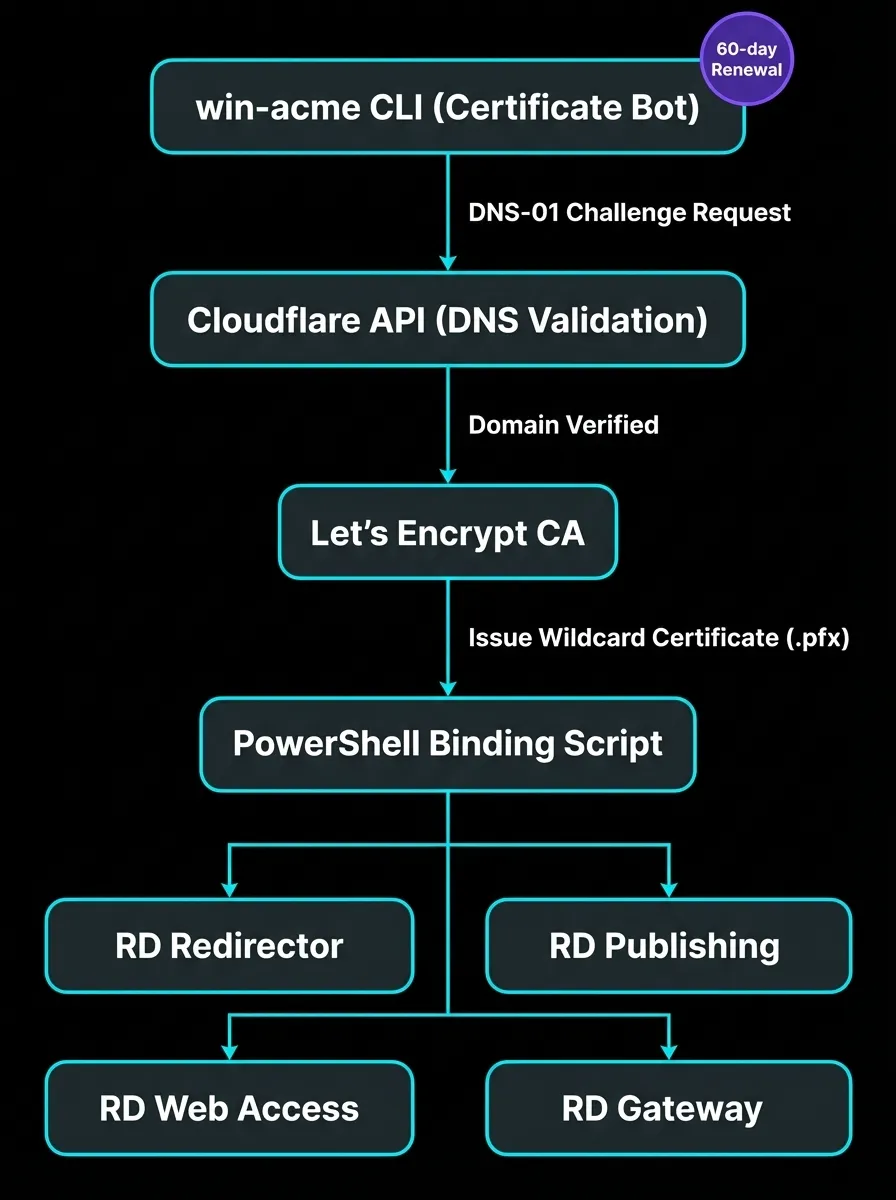
The lifecycle diagram from the case study: issuance through win-acme, DNS-01 via Cloudflare, binding on renewal.
The script that binds all four roles
Generating the certificate was half the battle. RDS requires the certificate bound across four separate roles, and missing one means that role keeps serving the old self-signed cert. The PowerShell script below runs automatically on every 60-day renewal:
# PowerShell script triggered automatically by win-acme upon successful 60-day renewal
Import-Module RemoteDesktopServices
$CertPath = "C:\Certs\erp-internal.pfx"
$Password = ConvertTo-SecureString -String $env:PFX_PASSWORD -AsPlainText -Force

# Bind the Let's Encrypt wildcard certificate to the entire RDS deployment topology
Set-RDCertificate -Role RDRedirector -ImportPath $CertPath -Password $Password -Force
Set-RDCertificate -Role RDPublishing -ImportPath $CertPath -Password $Password -Force
Set-RDCertificate -Role RDWebAccess -ImportPath $CertPath -Password $Password -Force
Set-RDCertificate -Role RDGateway -ImportPath $CertPath -Password $Password -Force

Write-Host "Tally Prime RDS Infrastructure TLS Certificates updated successfully."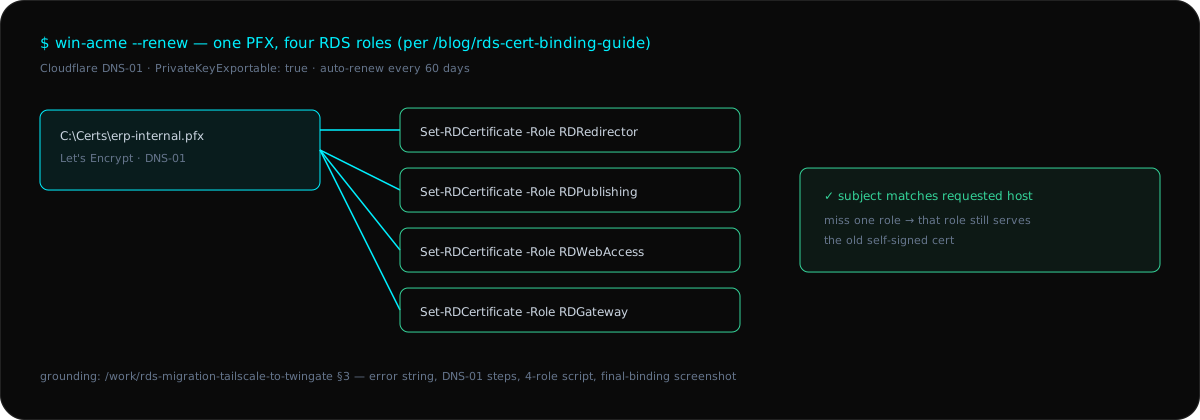
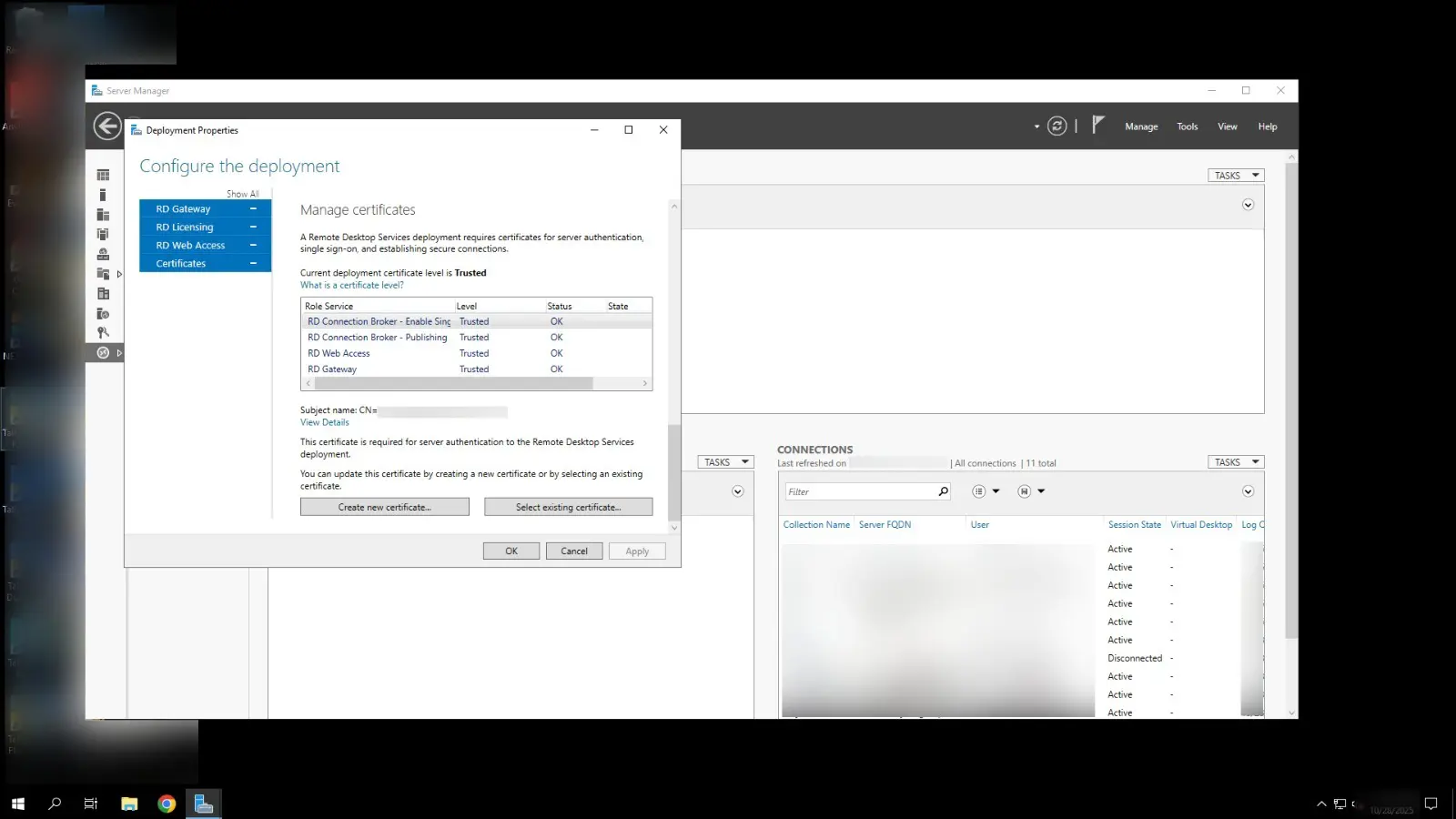
Verification: the valid Let’s Encrypt certificate bound to the RDS Gateway, checked after each renewal rather than assumed.
Honest limitations
- Single-connector estate. The case this fix ships in runs one Ubuntu connector VM: a single point of failure the case study’s own retrospective flags. The certificate pipeline does not fix that.
- No renewal-failure alerting described. The script binds on successful renewal; a failed renewal that leaves the old cert expiring has no documented page path in the case.
- Example-internal names.
erp.example.internalstands in for the real internal FQDN throughout — substitute your own before running anything here.
Search the error string and you find forum threads ending in “just click through the warning.” Thirty minutes of win-acme plus four Set-RDCertificate lines holds for every 60-day cycle after, and the overlay path that created the mismatch is exactly what the RDS migration case and its narrative companion describe: ZTNA changes which hostname the client requests, and RDS validates that name against its bound certificate.
Related logs
What Prometheus Sees: Monitoring 10 Branches from One Grafana
The unified-infrastructure case claims Prometheus and Grafana observability — this is the architecture behind the claim: what gets scraped, what the dashboard shows, what fires alerts, and the one blind spot the design still carries.
Tally Prime on RDS RemoteApp: The Day-2 Shape (Sessions, Licenses, Certificates)
The RDS cutover posts cover the migration night — this is what operating it looks like after: session-broker license management, timeout policies at peak hours, the 60-day certificate cycle, and the connector you still have to watch.