Tally Prime Remote Access: Migrating RDS from blocked Tailscale to Twingate
How I bypassed ISP-level DPI restrictions in Oman to restore Tally Prime ERP access. A migration from Tailscale to Twingate using RDS RemoteApp, Let's Encrypt, and Zero Trust principles.
$ outcome
Restored Tally Prime ERP remote access over a weekend after ISPs blocked the VPN protocols the estate depended on.

$ cat stack.json
- Twingate
- Windows Server 2019 RDS RemoteApp
- Ubuntu 24.04 (Hyper-V connector)
- Let's Encrypt via win-acme
- PowerShell
$ timeline
$ session.log
$ tailscale netcheck
Report:
  * UDP: false
UDP blocked on every branch link — WireGuard handshakes never complete.

$ win-acme --renew --force
[INFO] Renewing certificate for erp.example.internal
[INFO] Authorization valid (dns-01)
Tally Prime RDS Infrastructure TLS Certificates updated successfully.
- branch client TLS 443
- Twingate connector ZTNA policy
- RDS RemoteApp RDP
- Tally Prime
Overview
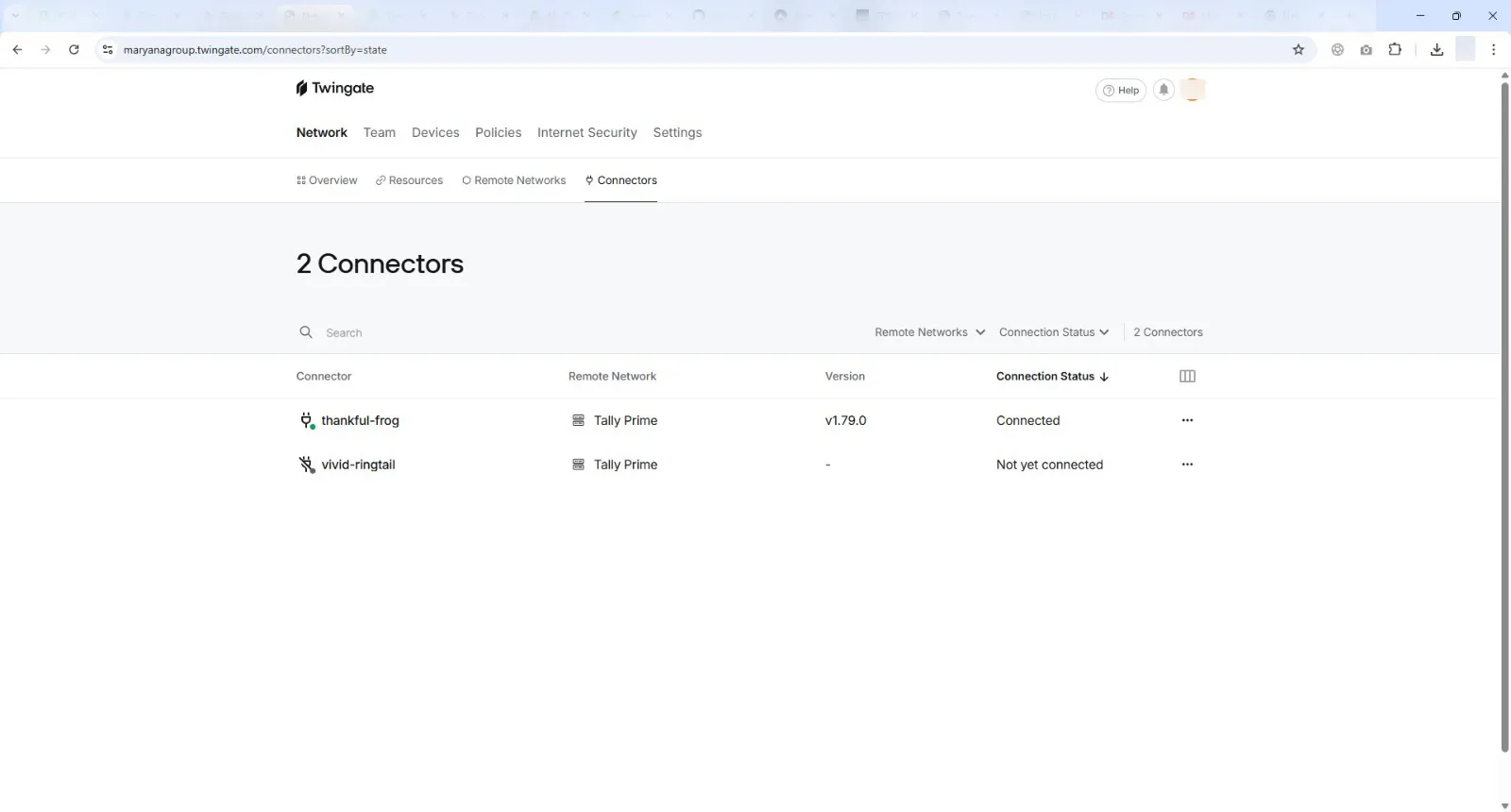
Remote access to the core Tally Prime ERP system at Maryana Group went dark. The system is served via Windows Server 2019 RDS RemoteApp, and ISPs in Oman had started blocking the VPN protocols the whole estate relied on.
I migrated the architecture from Tailscale (WireGuard-based) to a Twingate Zero Trust Network Access (ZTNA) setup. Twingate’s connectors use outbound TCP/TLS connections, which look like standard HTTPS traffic to ISP firewalls. They pass Deep Packet Inspection (DPI) without a public IP or inbound firewall rules.
The migration took a weekend. Remote access was back before the next business day.
- Fri evening: branch managers report complete connection timeouts; Tailscale clients cannot reach the control plane or establish peer data planes.
- Fri night:
tailscale netcheckfrom affected branches reportsUDP: false. WireGuard handshakes fingerprinted and dropped by ISP DPI, confirmed as root cause. - Sat: Ubuntu Server 24.04 connector VM provisioned on Hyper-V and bridged to the Windows RDS host over the private subnet; Twingate outbound TCP/TLS path verified past double NAT.
- Sat night: RD Gateway rejects routed connections with certificate subject-name mismatch; the
win-acmeDNS-01 pipeline plus PowerShell binding across all four RDS roles resolves it. - Sun: access live before the next business day; zero business days lost within the 36-hour weekend window.
tailscale netcheck
UDP blocked on every branch link — WireGuard handshakes never complete.
Twingate path uses outbound TCP/TLS: looks like HTTPS to ISP firewalls
win-acme --renew --force
Tally Prime RDS Infrastructure TLS Certificates updated successfully.
Tech Stack: Windows Server 2019 RDS RemoteApp, Ubuntu Linux (Hyper-V Connector), Let’s Encrypt (win-acme), custom PowerShell automation for certificate lifecycle management.
1. The Problem
Remote access to the Tally Prime ERP system was severed. It’s hosted centrally via Windows Server 2019 RDS RemoteApp in the Muscat datacenter.
The existing setup relied on Tailscale. Then the Telecommunications Regulatory Authority (TRA) in Oman tightened enforcement on encrypted communications, and local ISPs stood up Deep Packet Inspection (DPI) firewalls that identified and dropped unauthorized VPN packets.
Diagnostics & Root Cause Analysis
Branch managers reported complete connection timeouts. What I found: remote Tailscale clients could no longer authenticate with the Tailscale control plane or establish peer-to-peer data planes.
- Deep Packet Inspection (DPI) Fingerprinting: Running
tailscale netcheckfrom affected branches consistently failed, reportingUDP: false. Tailscale relies on the WireGuard protocol (UDP). The ISP firewalls were fingerprinting WireGuard handshakes and silently dropping packets.
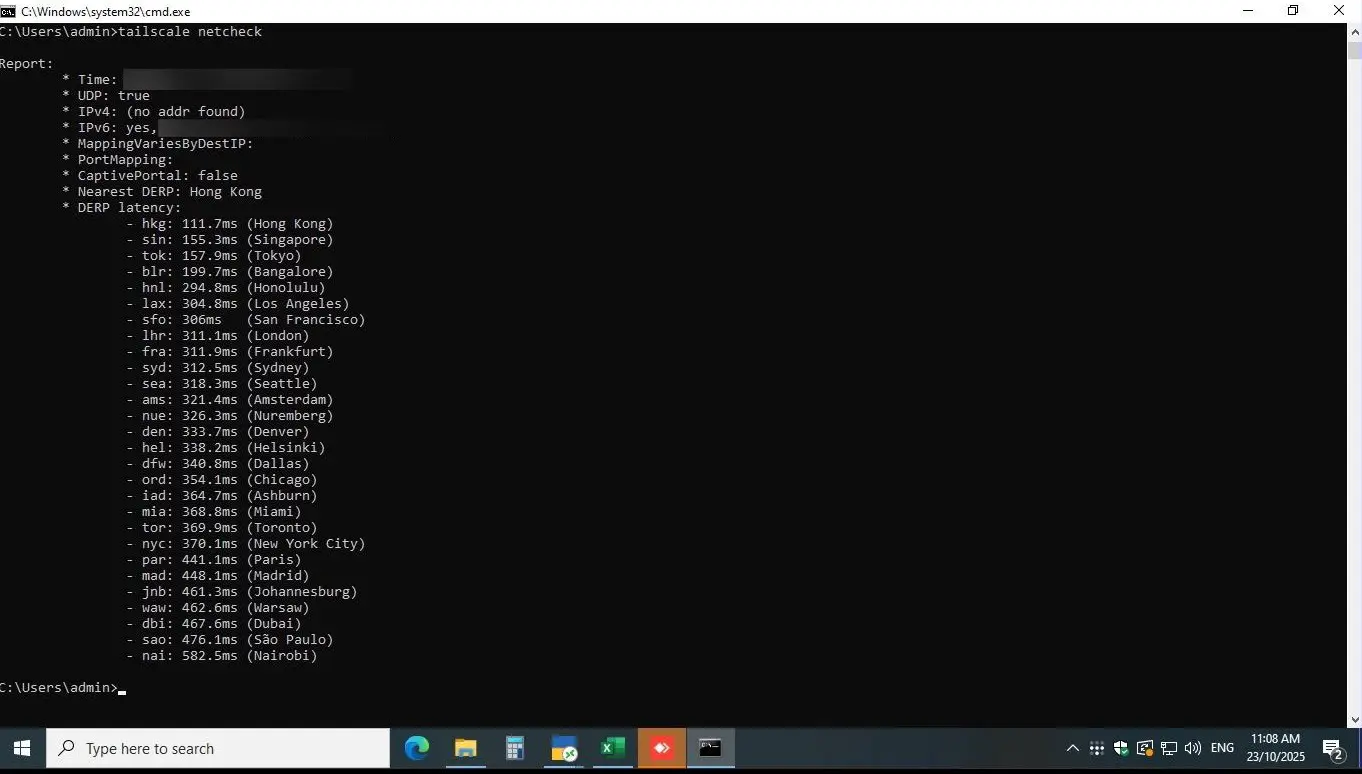 Command line output showing blocked UDP traffic indicative of ISP DPI filtering.
- Double NAT Complexity: The central server sat behind a restrictive Double NAT topology (Huawei 5G Modem → TP-Link Omada Router). Direct hardware IPsec VPNs weren’t possible since the ISP didn’t provide a routable public IP.
2. Architecture
The business needed a way through Double NAT and past ISP DPI. Quietly, without drawing regulatory scrutiny.
I chose Twingate as the replacement, and I’d make the same call again: unlike Tailscale’s UDP-based peer-to-peer mesh, Twingate’s Connectors rely on outbound TCP/TLS connections to its cloud relays. To an ISP firewall, that looks like standard HTTPS web traffic. Nothing to fingerprint.
High-Level Network Architecture
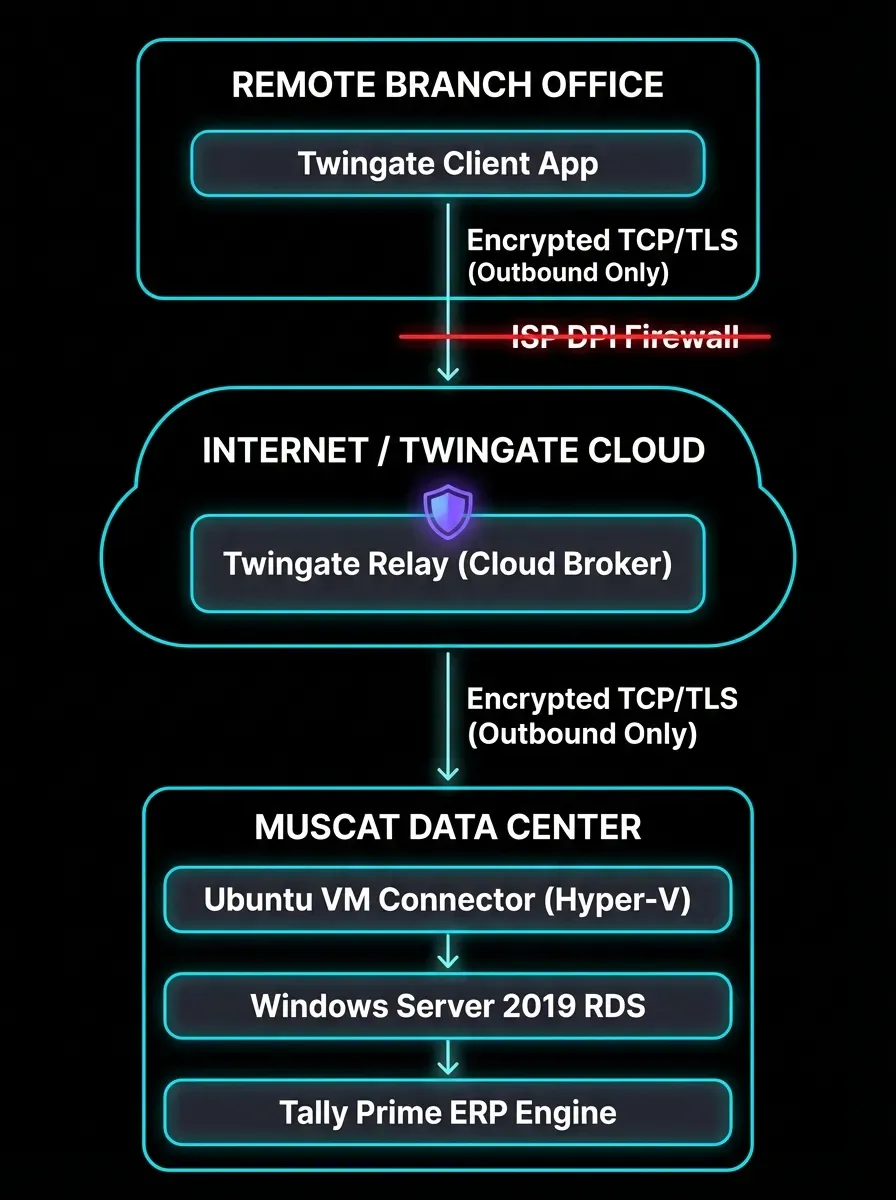
Zero Trust Data Flow: The Remote Client requests access. The Twingate Cloud Relay brokers the connection. The Ubuntu Connector (running inside the protected LAN) establishes an OUTBOUND TLS connection to the relay, pulling authorized traffic back in, bypassing inbound Double NAT restrictions entirely.
Phase 1: Infrastructure Deployment
- Headless Connector Deployment: I provisioned an Ubuntu Server 24.04 LTS virtual machine on the host Hyper-V hypervisor. This lightweight Linux VM acts as the “Twingate Deployer,” the bridge between the cloud controller and the internal Windows LAN.
- Network Bridging: Configured a Hyper-V External Virtual Switch, assigning the Ubuntu VM a static IP on a private RFC 1918 subnet, giving it local line-of-sight to the Windows RDS host without exposing the Windows Server to the internet.
3. Implementation
The hardest problem showed up in final testing. The Twingate tunnel was routing TCP traffic to the Windows Server over ports 3389/443, and the Remote Desktop Gateway (RDG) still rejected the connections.
- The Error: Clients attempting to launch the Tally RemoteApp received “The server’s certificate subject name does not match the requested hostname” errors.
- The Cause: RDS expects clients to connect using a public FQDN (e.g.,
erp.example.com). But Twingate routes traffic using internal DNS (e.g.,rds-host.example.internal). The Windows self-signed certificate had a subject name mismatch.
The Let’s Encrypt Automation Fix
To resolve the SSL conflict without purchasing premium certificates or retraining users to ignore security warnings, I built an automated Let’s Encrypt pipeline using the win-acme CLI tool and Cloudflare DNS validation.
- Created a private DNS A-record (
erp.example.internal) resolving to the internal IP. - Configured
win-acmeto use the Cloudflare API for DNS-01 challenges, bypassing the need for port 80 to be open.
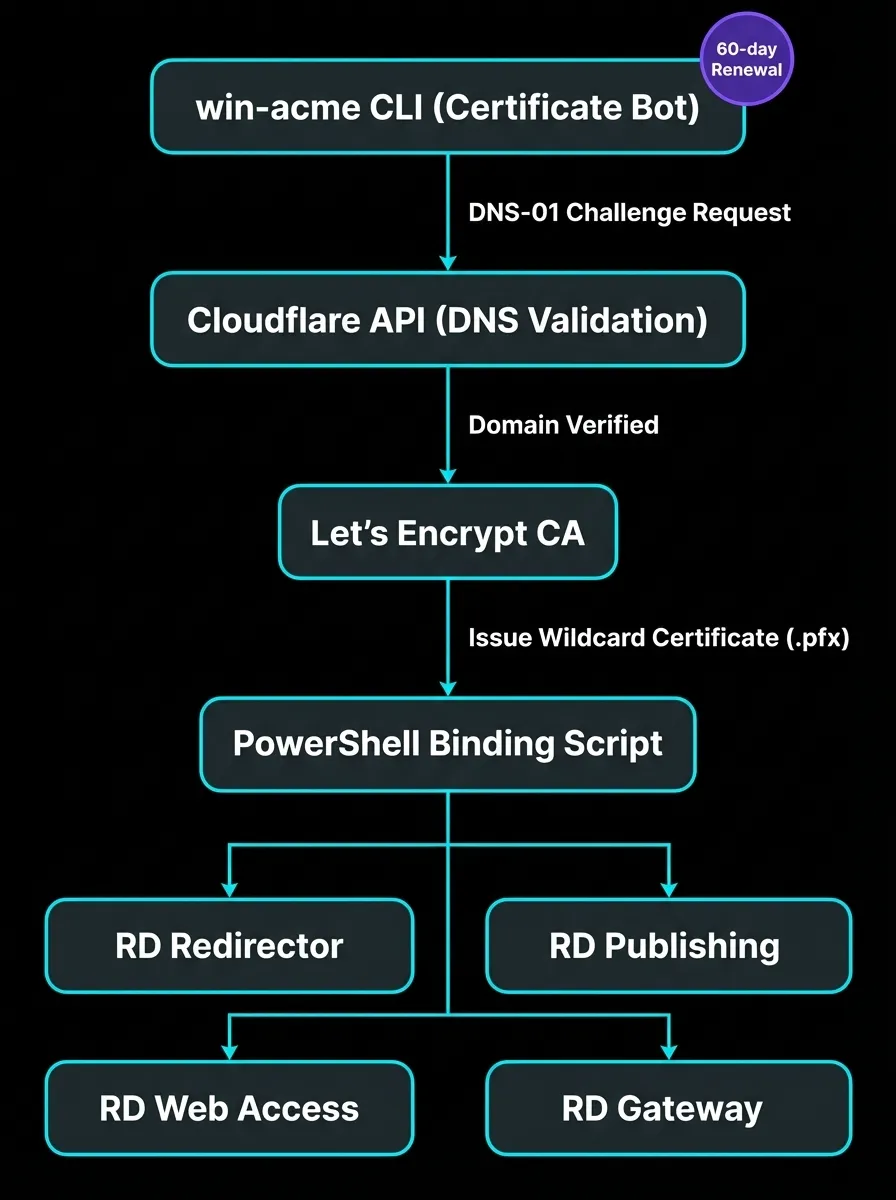
The PowerShell Binding Script:
Generating the certificate was half the battle. RDS requires the certificate to be bound across four separate roles. I modified the win-acme JSON config to force "PrivateKeyExportable": true, and authored the following PowerShell script to automate the cryptographic binding on renewal:
# PowerShell script triggered automatically by win-acme upon successful 60-day renewal
Import-Module RemoteDesktopServices
$CertPath = "C:\Certs\erp-internal.pfx"
$Password = ConvertTo-SecureString -String $env:PFX_PASSWORD -AsPlainText -Force
# Bind the Let's Encrypt wildcard certificate to the entire RDS deployment topology
Set-RDCertificate -Role RDRedirector -ImportPath $CertPath -Password $Password -Force
Set-RDCertificate -Role RDPublishing -ImportPath $CertPath -Password $Password -Force
Set-RDCertificate -Role RDWebAccess -ImportPath $CertPath -Password $Password -Force
Set-RDCertificate -Role RDGateway -ImportPath $CertPath -Password $Password -Force
Write-Host "Tally Prime RDS Infrastructure TLS Certificates updated successfully."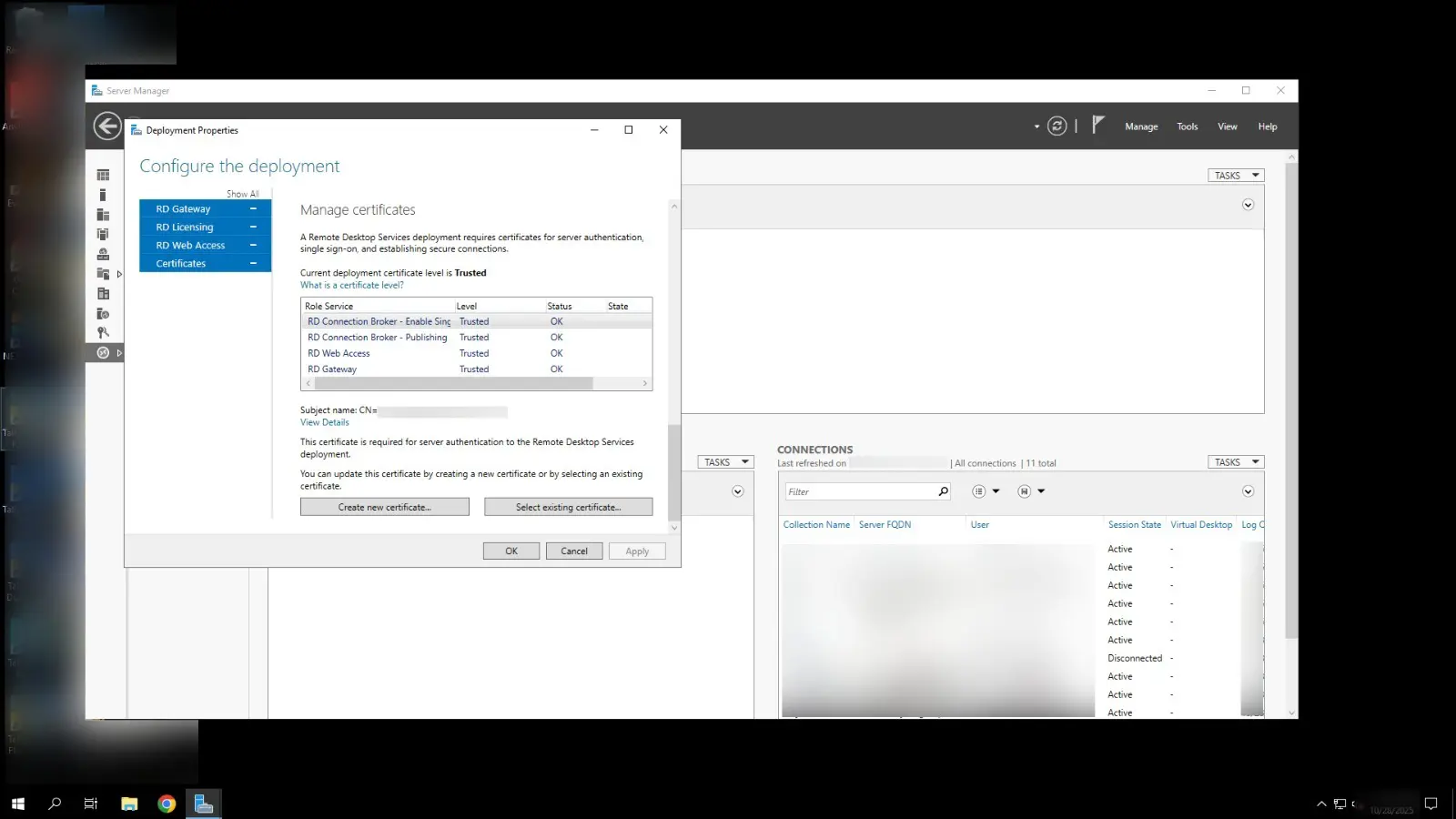 Verification of the valid Let’s Encrypt certificate successfully bound to the RDS Gateway.
4. Operations
Nothing in this estate phones home except the two things designed to: the Twingate connector’s outbound TLS heartbeat and the 60-day win-acme renewal. Zero inbound ports are open on the corporate firewall, so there is no scanner noise to chase. The renewal script binds all four RDS roles on every cycle, and the final-binding screenshot above is the verification. A valid Let’s Encrypt certificate sitting on the RDS Gateway, checked after each renewal. Never assumed.
Cost is flat: Twingate’s free tier covers the connector count, Let’s Encrypt certificates are free, and the Ubuntu connector VM rides on the existing Hyper-V host. No public IP to lease, no hardware VPN to maintain.
5. Results
- Downtime: zero business days lost. Cutover completed within a 36-hour weekend window, access live before the next business day (48 hours from incident declaration to full branch connectivity, including testing and rollback planning).
- Access: Twingate’s outbound TCP/TLS architecture evades the ISP’s UDP-blocking DPI entirely, behind double NAT with no public IP.
- Maintenance: Let’s Encrypt certificates auto-renew every 60 days via the injected PowerShell script. No ongoing administrative intervention.
- Security: zero inbound ports open; access governed by IdP SSO under a true Zero Trust model.
- Performance: user-reported typing latency inside the Tally Prime RemoteApp decreased versus the previous Tailscale setup.
Figures as of Oct 2025.
Still one connector
The estate runs today on a single Ubuntu connector VM, which is the part of this case I’m least comfortable defending. It carries every branch, and if that box dies, every branch goes dark together. The fix is a second lightweight connector on a different Hyper-V host, and it’s the first item in the Phase-2 plan: same outbound-TLS shape the ISPs already wave through, minus the single point of failure. Until then, the honest summary is that the migration traded a protocol the firewall could see for an architecture with one box holding up the roof.
What I’d Do Differently
Probe the path before committing to the protocol. I diagnosed the DPI block from timeouts and user reports, but I ran the decisive tailscale netcheck (UDP: false) only after Tailscale was already failing in production. A 30-second UDP probe from each branch during evaluation would have flagged WireGuard as undeployable before it became the thing to migrate away from.
And I would have scoped the connector footprint smaller from day one. One Ubuntu connector VM carries the whole estate today, which is a single point of failure wearing a Zero Trust badge. A second lightweight connector on a different Hyper-V host would have cost nothing extra and removed the one box whose death takes every branch offline.
“The firewall didn’t care how good the VPN was. It only cared what the handshake looked like.”
For the narrative version with the Thursday-morning timeline, see Tailscale Blocked? Moving Tally Prime ERP to Twingate ZTNA. For the full curated record (comparison table, ADR verdict, stack notes, intake checklist), see the Zero Trust for Small Business guide.
Continue Reading

Migrating something similar?
I led this deployment end to end — scope, cutover, and guardrails. Tell me what you are running and I will reply with a migration sketch.